Hi Everyone,
I made a print of a head / bust on my Zortrax M200 over the weekend. The print came out great, except for one noticeable crack spanning the top-middle of the figure. I thought that perhaps I had cracked the bust myself when I scraped it off the platform, but I printed another copy and the same weird crack appeared. As far as I can tell, the model is watertight, so I’m wondering if anyone has any idea what the problem might be.
-
I had some trouble leveling my build plate before printing - I fought with the center knob adjustment for almost a half hour before I just said “Screw It” and printed anyway. I kept getting the “too high / too low” messages, despite readjusting the knobs to just about every position I could - I raised the platform so much that the screw anchoring the knob actually came off. And I still couldn’t get the confirmation of a level platform from the LED screen. If anyone has any tricks for leveling the build platform more effectively, I’d be grateful for those as well.
I’ve attached pictures of the model so that you can see what I’m talking about.
Thanks in advance for your help - this forum is always a life saver.
-matt
2 Likes
Hi Matt,
The crack seems to be made by material warping. What filament did you use for the head? I recommend Z-ULTRAT as the easiest to print with small warping.
What comes to bed leveling, I also spend a lot of time over it. Go down with all 3 screws. Watch them carefully because sometimes they lock and even they turn, they don’t move platform up/down. Look under platform to see if they move up/down. It should work.
Good luck!
Bart
Hello, the first thing you do when you send a job you have to do manual calibration, the one with the thickness of cardboard 0.02 below the extruder, as regards the issue of press breaks, try to put the panels that insulate M200 printer from the outside, that the prototype does not take temperature changes, making this way the problem is solved to 70-80%, greetings
Check in zsuite if the buste is actually printed in 2 parts. Scroll through the levels with the tool to set pauses. Zsuite fails to print different components as one. I filled a bug report for this as it resulted in parts splitying for me aswell. Regards, Rob.
Hey Bart, Thanks!
I’ve been using the filament that came with the machine - Z-ABS, I assume. Is that known to warp in the way that I’ve described?
I will ask the obvious:
- Did you process your model through NetFabb or 3D Builder to correct any possible issues (I use http://netfabb.azurewebsites.net on-line or 3D Builder from Microsoft)?
- What material and resolution were you using?
- Make sure the Z-Suite material settings match the actual material in the printer.
I have never seen a crack like this on a Zortrax machine and I have printed hundreds and hundreds of parts on my Zortrax M200. I have had the usual issues, warping, stringing, etc. but not a crack like this.
If you did not process this model through NetFabb or some other software to correct any possible issues I would start with that first.
If you have already corrected the possible issues with the model and you are using Zortrax Material with the correct settings (I have had made the mistake of slicing with Z-Suite for a certain material but actually had a different material in the printer) then it might be a hardware issue, how old is the machine? Are the belts tight?
As far as leveling the table do the following:
- First Tighten All the thumb screws all the way down making the screws close to the bed
- Second start the Auto Calibration Cycle
- When the machine tells you to turn the screw, make sure you are turning the screw in the correct direction and turn the screw only slightly, a couple of degrees.
If you cannot level with the Auto Calibration then you could manually level the table (I have to do this sometimes):
- TURN OFF YOUR MACHINE FIRST - Do NOT Move Your Extruder Head or Bed with the machine on, damage can result
- Move the extruder head manually to the rear left of the machine (be careful the extruder might still be hot)
- Move the Z-Screw to raise the bed manually and using a business card or piece of paper move the bed up until the paper or card move with resistance.
- Do the same in all four corners of the bed - make sure the Z-Screw did not move on it’s own back down, you may have to hold it in place - keep in mind that you don’t have to do an exact leveling at all four corners but try to get as close as possible, the Zortrax M200 tests the bed each time it prints and adjusts the raft height accordingly.
- Keep in mind that you are NOT trying to calibrate a gap distance here you are just trying to make sure that the bed is level all the way round. The Zortrax M200 auto calibrates the gap each time you do a print and adjusts the raft height accordingly.
- When all four corners are reasonable leveled you may proceed to print.
I hope some of this helps you.
Please keep us advised on your progress.
Cheers,
Peter of PeterMake 3D
Do you have side panels? I printed larger prints in white Z-ABS but I have enclosed printer. Warp crack occur always between layers. Try looser infill and more supports (to insulate print). And cover frame holes if you haven’t yet.
I don’t have side panels. How exactly do those improve the quality of the print?
I’ll give the looser infill and more supports a try. What would you recommend in Z-Suite?
And, stupid question, but what are frame holes? Haha.
Hi MC,
This is Peter again.
Usually with warping it’s on the bottom of a part.
Your issue may be warping but again I have never seen a part split like that.
As others have suggested, level your table, manually if you have to.
Put cardboard around sides of your machine and in the front to try to retain heat.
Try Z-Ultrat or even Z-HIPS, I use Z-HIPS all the time to print my models as it print a lot nicer then Z-ABS or Z-ULTRA and it has other benefits as well.
Cheers,
Peter of PeterMake 3D
Frame holes I mean that huge front and side holes in printers frame:) You can even cover them with foil the way air can’t blow on the print inside. Top hole should be left open. Search web for the pictures of Zortrax equipped with side covers.
To be honest I don’t know how they improve print quality because I’ve never tried without them;)
Great…I’ll give all this stuff a try. Thanks again for your help!
PS - Is there any other software that works with the Zortrax, besides Z-Suite? I don’t mind Z-Suite at all, really, I’m just curious to know if there are other options that might allow for more custom printing profiles (such as Simplify3D, which doesn’t work with the Zortrax)
Covering the “holes” allows for proper heat retention and restricts excess airflow from the printer’s surroundings. This prevents a temperature imbalance that can induce warping, especially with ABS. I’d highly recommend going through a 3rd party source for these parts since the Zortrax brand parts are quite expensive. I suppose you could always make your own as well.
As for different software, I would personally be reluctant to use any other software since Zortrax has put tons of effort into maintaining its technology and keeping it proprietary. Correct me if I’m wrong but Zortrax uses .zcode files, a derivative of the common .gcode file. Unless you are able to find a way to make sure a different software can write in this code it’s probably not going to work, or work very well. If you find a way to do so, that would be awesome!
That’s right, Zortrax uses different type of machine code and I’ve never herd about running it from other slicer than Z-Suite. Anyway, although Z-Suite looks simple and minimalistic it’s surprisingly powerful. From my experience Z-Ultrat is the best material to prevent warping. I tried HIPS is also good but has worse adhesion what cause print to deform.
I wish you successful prints!
1 Like
Kelly_1
14
Hi, don’t know if this will help with the cracks in your prints but I agree with all the posts that leveling the bed and heat is a major problem sometimes. Just that when you mentioned not being able to level the bed reminded me of something I had to do once I had that same problem.
Not sure if anyone has taken apart the heating platform/perforated sheet combo. I was curious one day to see how they came apart and took all the hex screws out that attach the perf board to the heated platform. What I found should have been more obvious. Filament balls!!
Lots and lots of balls the size of the perforations. Every time you scrape a print off the board some of the plastic stays in the the holes. As the printer prints over them some of them get pushed between the board and the heated bed. After I cleaned off both the heated bed and the other side of the perf board the calibration worked like new!
Kelly
1 Like
Hey,
Looks like covering the holes (side and front) worked - I used aluminum foil last night, and the print came out dramatically better.
Where can I purchase some of the third party parts? All I’ve seen are the ones on eBay that seem to be from the Zortrax retailer. They go for about $79. Are there other options available?
Thanks again for your help!
matt
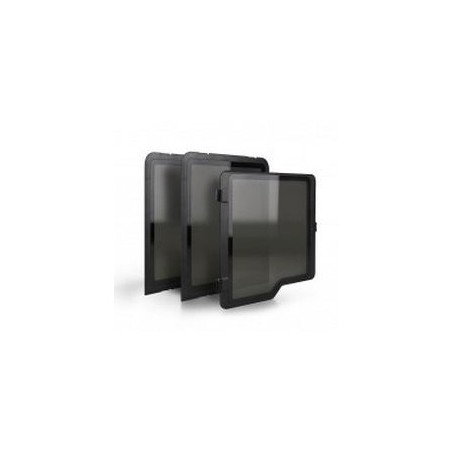
There are some other options available but not really much cheaper than $79.00.
I do not believe that you will be getting real Zortrax panels for $79.00 and if you are please let me know where they are available for $79.00.
The Zortrax Panels made by Zortrax are excellent but they usually go for $99.00.
They fit right in, no screws, no magnets to install.
Very easy to install. They stay on.
The Door keeps closed (build in magnet to keep door closed).
They work and look great.
Peter Make 3D
http://www.petermake3d.com
Authorized Zortrax Reseller
1 Like
I bought these covers from Octave Systems for $59 and they have worked for me for a year now. They are laser cut acrylic with 3D printed latches (included) that do not require tools to assemble. If you want the cheapest off the shelf solution this is the best and lowest price I’ve found.
Hey,
Man, you’ve got 3D printer, you can make your own covers yourself;) Print clips, lasercut 4mm acrylic and you would have them for less than $20 and in colour you like!
Before buying my covers I was considering using mylar foil (metalized BoPET) what would look to me pretty awesome!
That’s an odd issue. I have printed many items of similar size and shape in Z-ABS without problems. What was the support angle you selected? Due to the chin overhang it definitely needs some support while printing. I suggest 20-45 degrees.
You might also try a simple test by cutting some cardboard to fit the sides and tape it in place with masking tape. You can still see the print progress from the open top. This may help stabilize the temperature and prevent cracks. I also might try printing it in Z-HIPS or Z-ULTRAT.
Sometime i have the same problem but on layer level. An always on Z-ABS. Will be much better than u will try use Z-Ultrat.
o also u can send me the stl file and i can check it on my printer.
Good Luck


