bill_m
1
Hello everyone:
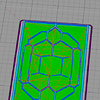
I am printing a scaffold for a microfluidics chip. As you can see in the image, the outer part of one of the sides is filled, whereas the corresponding half on the other side of the print is completely fine. What are the possible reasons for this happening?
Moreover, I ran my print through an online 3d printer cleaner.
I have attached the stl as well as the gcode for this particular drawing. I can’t attach the solidworks file, however.
Thanks,
Bill
square_f.gcode (4.04 MB)
square_f.stl (1.01 MB)
Zapaer
2
Hi @bill_m,
It might be that the bed was not leveled properly. So the corner was higher than the other 3.
From the pictures I can see that you are extruding way too close to the bed. You should recalibrate the nozzle to bed distance.
Also it seems you are extruding too much plastic, you might want to extrude at a lower temperature and see if that makes a difference.
What material were you printing? What were your print settings (speed, temperature etc).
You should probably also check your retraction settings, as it seems the pattern you see on the corner is from the travel moves.
Finally, this might be of use to you: Print Quality Guide | Simplify3D Software