libc
1
Hey everyone - I’m new the 3D printing with a FlashForge Creator Pro. My builds are both warping after a certain height and on the first layer. Also, straight lines in the first layer don’t always adhere to the plate.
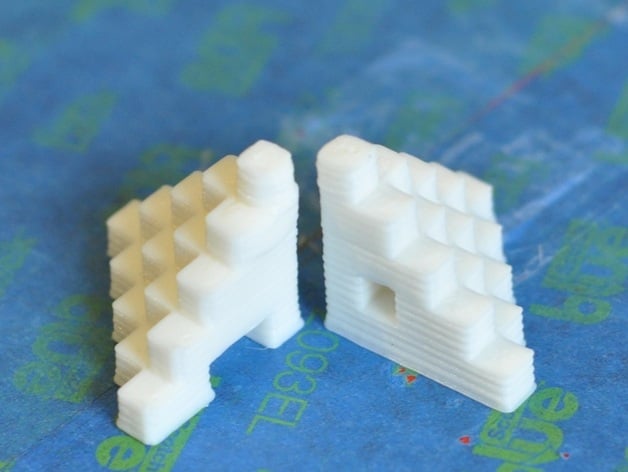
Per a YouTube video, I’ve set up Slic3r and used this series of stepped cubes to test:
Here’s what I’ve tried so far, none of which fixes the warping at height:
- Levelling the build plate with the sheet provided by FlashForge
- Setting the filament diameter after measuring it with calipers
- Setting the layer height to 0.2 mm (the height of the sheet from #1, measured with calipers)
- Increasing/decreasing the extruder temperature between 200 °C and 240 °C
- Increasing/decreasing the plate temperature between 100 °C and 115 °C
- Fans at 100%/20%
- Skirt/no skirt
- Setting various speeds recommended by various posts, all by people with the same machine
- Wiping the build plate with 100% acetone
In fact, #9 caused the warping of straight lines.
My current settings are 240 °C extruders and a 115 °C plate - the plate being the one shipped with the machine; not glass or covered with off-the-shelf tape. I’m not sure what other variables are important other than consistent air temperature: I keep the room at 25 °C.
Does anyone have ideas on how I can remedy this warping? Am I missing something obvious? Thanks!
edit: I’m using ABS.
3 Likes
I have a flashforge as well as a Dremel but the flashforge is not for use by the public. So you need to check the nozzle about its opening. I have clogging and leveling issues. Those are the most common problems for 3D Printing. I have been printing for 6 months.
If your parts arent sticking to the plate, your nozzle is too far from your bed platform. First layer is the most important part of any FDM machine print. You’re looking for a layer that looks somewhat squished, but not too much. If you are still getting squiggles or inconsistencies on layers after printing, its an indication you may have a clog in the nozzle (the squiggles). Take off the nozzle and give it a nice bath in Acetone overnight. Then relevel your bed.
1 Like
Anssi_1
4
Level build plate with heats on. The top problem is just heat. Make active cooling or print multiple items at once.
i suggest using glass plate.
Looks like it might be printing too fast and not enough time to cool each layer.
What are your speed settings?
1 Like
libc
6
Thank you! This solved the warping at height, although not the squiggles. I created a 5x5x50 solid and printed out several tests of it with various extrusion multiplier settings. Somewhere between 0.85 and 0.9 seems to be the best. I’ll try re-levelling and the other suggestions tonight.
The responses I’ve seen all look pretty good, but let me state something so obvious that I think it is being overlooked. ABS is very soluble in acetone. You wiped your plate w/ it and that is why your straight line is warping. Make a slurry by by dissolving some scrap ABS in your Acetone. Enough so it looks kinda like skim milk I keep my slurry in a glass jar with a metal lid because most plastics don’t stand up well to acetone. Wipe your build plate with that and let the acetone evaporate. (keep the area well ventilated.) This leaves a thin layer of ABS on the plate that your extruded ABS will stick to nicely. So much so that you may have trouble getting the raft off the plate. Use a plastic putty knife, just left the build plate cool first.
Likewise, I use a HIPS/Limonene slurry (it’s not nearly as soluble, but it works) when extruding HIPS and a purple glue stick when extruding both. For instance, when one is being used as a support medium.
As far as temps go, every machine is different. I seem to run mine cooler than most. I extrude ABS at 220 and my build plate is usually 90. One last thought - It never hurts to slow down. It actually saves time compared to re-printing.
1 Like
libc
8
I’ll post the speed settings tonight once I’m off work.
edit: I’ve attached a photo with the speed settings
libc
9
Thanks Pherb. I’ll try the acetone slurry.
libc
10
I had planned to try a glass plate eventually but I want to see what I can do with the components I have. Thanks though!
libc
11
My nozzle seems to be clear but I’m not sure. Is there a way to check without disassembling the extruder?
libc
12
An update to anyone who’s following along (or finds this):
While watching a print from the side, I noticed that the extruder head’s height from the bed decreased from about 2mm to 1mm going right to left: the bed was extremely unlevel. he FFCP has three bed adjustment screws and the firmware’s levelling routine places the extruders at a single point in the center of the plate.
I found this Reddit post where someone with the same machine manually levelled the plate by:
- Sending the extruder to the home axes
- Turning off the machine
- Lowering the plate a bit
- Manually moving the head over the position of each screw and testing the gap with a piece of paper
I realize that this is similar to the levelling routine on the previous firmware (and maybe one of these gcode routines) and probably the first thing that everyone’s done. Too bad I missed it! (my FFCP didn’t come with an SD card, so maybe the routine is on that?)
Levelling the plate properly fixed the squiggly lines and changing the extrusion multiplier settings fixed the height warping.
Thanks everyone for your help.