I have buyed one the 2016 Sunhokey Aluminum big size High Quatity Precision Prusa i3 plus .
The problem is that when i am trying to print circular objects that prints that not. What can that be?
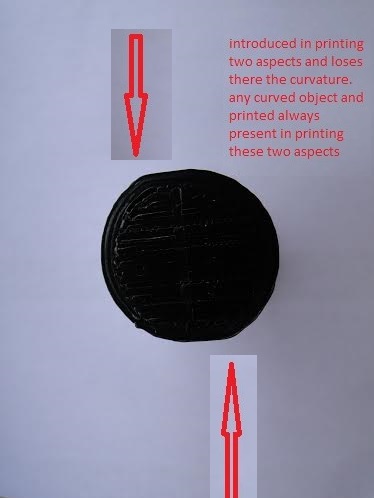
My first thought would be that something is loose in one of the axis movements. Loose belt, carriage, or something like that. Does it print flat/square objects evenly? No uneven surfaces?
1 Like
Thank you! The corners are little rounded but i am neu in 3d printing. I can not say if they are or i am thinking that
It does look like the corners are a little off. Is this an image of a completed print, or just testing a partial print?
What is your print speed set at? You can try slowing it down to see if that changes things. As long as the mechanical parts are set and working properly, we can start looking at software settings to find the issue.
1 Like
I am printing slow.10% first layer 30% for the others. I am learning the primitives. That was one cube.I am uploading one photo that was one the printer, quality control, from the seller so you can see that the corner were not so good.I thing that the left corner have -1y than it is supposed to have and the right corner +1x. I can upload my settings if you like
Lets look at your settings.
Seeing each of the pictures, it definitely looks like there is an extrusion problem. Not closing the gaps between the lines, and the corners being extended as well.
Yes i am posting my settings. The surface are better now but because i have printed with ABS ( White printings ) without that to know. Now i am printing with PLA (Black printings). The circularity problem are not better and that is my probem. I am posting now one bild with one new printing and later i am gonna writing my setting and post them as well with a new printing of a cube so you can better see.


