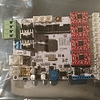
Thx i have been on YouTube all week. I did read about all the hate and some, not much love. I guess im not to afraid of tweaking and i have quite a lot of patience when it comes to things you do hand on since i dont do it in my work. Thx for the answer and i guess i need to get it home before asking really but im so impatient haha

Welcome!

You made a bold decision! You will spend a lot a time with that machine until it will print in a good quality.

Don’t get frustrated its not that difficult.

The machine you purchased is a Prusa I3 variant cheap Chinese printer. This printer is like a VW beetle its bit ugly and not so fast but there are tons of upgrade parts, and huge community behind.

It should have the Marlin Firmware pre-loaded into it(usually pretty old version) , and for a slicer program I advice to use Cura 15.04.6 first.

We are here to help, so don’t be afraid to ask. Yes there is google, you can search for any question, but usually it will just get you confused.

Watch some Prusa i3 build videos on youtube, it will help you to get the idea how these machines work.

Regards,

Tamas

1 Like

You use a business card instead of a sheet of paper?

Im gona build it, i think i learn alot but dont have to start from nothing. It sound fun and if something things are not straight or dont look ok i can machine it with perfect precision here. I love building stuff so i have a wood and metalshop with old but accurate machines. A big thx for answering about firmware!

Hey

This is a great printer for the price, but does take a good bit of tweaking and patience. I’ve made numerous modifications and documented some of them in a blog here http://www.nutz3d.com/

I had trouble finding the stock firmware for it and had to start with current Marlin release and modify the parameters by recording the values from LCD and then translating them in to the firmware parameters.

You might also find that the boot loader hasn’t been programmed in to your Mega2560 processor which will stop you uploading new firmware. I did manage to crack this and have detailed it in the blog too.

I had some great prints intially but got a few jams to have upgraded to a proper E3D v6 hotend after trying the E3D clones - go straight for the real thing. I also only use Verbatim filament as it rarely jams. Make sure your bed screws don’t come loose, use some loctite on them as this will affect accuracy and layers will not be on top of each other. I’ve also upgraded the threaded bar to lead screws which much improved my layer step.

Good luck and I’m happy to share my Marlin branch with you or help out with anything else.

Cheers

Dave

1 Like

Well here’s some more love for the machine… It printed immediately and acceptably out of the box, once I designed and installed my E3D V6 upgrade and the Z leadscrews print quality has been excellent, on par if not better than an FF Dreamer I’ve had prints from. I also only ever print with cheap ($10) filaments and have never had a reason to complain.

Most of this is due to budget, I don’t have the money to throw around for expensive filaments and a genuine E3D, but for the very low prices I pay for this stuff I’m getting very good results!

1 Like

Thx and nice channel! Im home with a sick kid today so while he watches minecraft ill plow true you videos and subbed. I am quite overwhelmed by the amount of people giving advice and helping. Thx!

I hope he watches Mumbo Jumbo! While still completely kid friendly Mumbo’s style is advanced enough that this 20 year old enjoys it (or at least that’s the excuse I keep telling myself)

I tend to upload on Wednesdays, in fact tomorrow I’m uploading a rather interesting E3D V6 hotend upgrade you may like.

And it’s true, a community that shares together cares together :slight_smile:

Hoi,
thats pretty simple:
in the description is REPETIER-HOST and PRINTRUN (i.e.) the Software for your Computer:
Instead of Printrun you can use similiar software like CURA etc.
Mostly MARLIN is installed as Firmware, but depending also on the Board the printer has.
i.e. GT2560…
Regards

I will check your blogg. Thanx for tips!

Oh i hate beetles… You can only change so much to make it better but i think i will learn more with this than a off the shelf good printer. I have always learned more from fixing problems and solving them. For me its more fun. I only wished i had more free time. And google and youtube arent always the best way to learn. Forums like this is awsome! Thanx

Hes only 8 so he looks at Swedish video mostly but i will show him the channel. Good tip!

First let me say that I purchased one of these cheap printers made in China.

I had lots of problem assembling it as one of the lead screw nuts was bad (z axis).

Next the circuit board (arduino processor) has had nothing but problems.

I cannot seem to push enough power to the z axis motors infact the wires from the power supply began to melt.

The driver chips (driving the motors) do not have heat sinks and acutally are under rated in my estimate which is probably why I cannot deliver enough power to the z axis motors. Then I have had display problems, which I still have, I plan on buying a different control board and hopefully resolve the problems associated with this one.

I am not saying you will have these problems but they are some things you may run into with cheap Chinese printers.

Get on youtube and find thomas sanladerer’s channel. He covers printer basic and the firmware and software tool chain you will use.

Welcome to the fun, frustrating world of 3D printing. There’s a lot to take in, so don’t worry.

Building your own 3D printer is a great way to get started, since you know what everything does. You won’t treat it like an Epson that you’re afraid to open up. When building a printer, make sure everything is square. It is absolutely important that the three axes are perpendicular.

You’re more than likely going to need the Arduino software. Go ahead and grab that, and read up about how Arduino works. The controller board that comes with your printer is more than likely going to be Arduino compatible, and this is the software you need to use to get the firmware onto the board.

You’ll probably start with Marlin firmware. It’s a big series of files but not to worry, the only one you really need to deal with is Configuration.h. All the settings for dimensions, temperatures, end stops etc are in there.

You’ll want to have a functional understanding of G-Code. G-Code is the language of CNC machines. It looks a lot harder than it is, and a complete reference can be found on the Reprap wiki (google 'g code reprap" ). This will help you set up your before print and after print routines, makes it a bit easier to calibrate the machine, and will eventually allow you to pull off some cool printer fu by directly editing part files.

I recommend Tech2C’s youtube channel. In addition to his fun Oz accent, he’s got some great information on calibration, upgrades, different filaments, and even building your own printer from scratch.

Thingiverse is a good resource for objects to print. You’ll probably want to start out downloading STL files rather than designing your own models. There you can find parts to help calibrate and test your printer.

You will need a slicer. That turns an STL model into G-Code your printer can read. I have experience with three: Slic3r, Cura, and Simplify3D. Slic3r is free, and it gives you a lot of options for how to set the printer up, but it can be difficult to dial in if you’re new. Cura is made by Ultimaker and released to anyone who wants it for free. It’s my go-to slicer as it’s simple to use and has some neat “magic” features, but it can be difficult to customize and it’s a little schizophrenic when doing things with a lot of bolt holes. Simplify3D is the best on the market, but it costs $150.

Good luck, have fun, and enjoy the process of drinking from a fire hose!

Sturdy and Reliable But you have to Calibrate runs on Merlin with a All in one board and electronic Motor tuning worth what you payed for it Limited to PLA and ABS but you can use PETG and HIPS I warn you not to get a Nozzle smaller then 0.035 thicker more viscus plastics and low Temp plastics (if you intend to cast part’s) will burn and Jam the Nozzle. Also throw out that Aluminum hot end and Use a Block, Cartridge Heater and Brass Barrel. Pain to set up but if you get a Jam it is easy to clear.

I thought all nozzles where made from brass. I guess i will make a new one as soon as i can measure the other one. I think it will arrive tomorrow but then its work and probably no time to even look at it.

Thanx. His journey from unboxing was really good and quite entertaining.

It have Arrived. Checked so all parts was ok and there. Looks good so far. With three kids at home i have to leave it for later. Thanx to you guys i at least know where to start and i will change some of the parts at once.

As expected that’s a GT2560 board in case you were wondering! There, I saved you about an hour of internet rummaging :stuck_out_tongue:

As a rough guide it took me about 4 hours to assemble my first printer but that may be because I was very familiar with the design due to the amount of research I did beforehand… but it shouldn’t take you too long!

One of the first things you may want to print are some self centering Z couplers.

If you go onto my 3Dhubs page or look me up as Acrimonious Mirth on Thingiverse you’ll see both parts I’ve designed for the same printer build as well as collections of mine that include the Z coupler and printed spares and stuff. You may find those useful :slight_smile:

Also the wires going to your X carriage… wrap those in spiral wrap or even electrical tape to keep them tidy and stop them rubbing on the frame as you use the machine. Also get a decent sized fan and search “MOAB GT2560” and your fan size which should get some results for fan mounts that clip onto your motherboard. Keeps things nice and cool!

I hope this isn’t too overwhelming, but we’re always here if you need any help! Having been where you are though, my Thingiverse may help you a lot :slight_smile: