Hello everyone. I’m relatively new to both this forum and 3D printing in general so forgive me if I say a few things that should be common knowledge. I got my printer about two weeks ago and I have to say I’m impressed overall. There have been a few kinks I’ve been able to iron out but there are also a few problems that I’m having that no matter what I’ve tried I can’t get passed and hopefully reaching out here can get me some answers.

First things first, I can not print anything that isn’t generated through ReplicatorG. I’ve tried everything from FlashPrint to even getting Simplify3D. Flashprint x3gs don’t ever stick to the plate and I can’t even get a proper configuration going in Simplify. Why is this? I have Silverfish 7.8 on the printer and everything looks like it should work in the settings which I haven’t touched other than laer height.

Secondly, whenever I’m leveling the build plate I always have the outside edges perfect (or at least I think they are) but when I move the head to the middle of the plate it is very snug on the plate. I can never get a configuration where the edges and middle of the plate tug the paper I use to level at an even rate. Is this a printer issue and if so how do I fix it? Perhaps I’m just unaware on how to properly level the bed in general?

Finally, there is an issue I experience a lot where the left corner of the print starts to lift. I have some images here to hopefully show what I mean. This is ABS.

As you can see from those images the corner just… Lifts. I can’t figure out why. It’s not extremely evident in the picture do to the lighting but there is a sort of different look to the area where it lifted. That’s probably because it wasn’t touching for as long as the other pieces were though.

Anyway, sorry if these questions are bad ones. I’ve looked around for a while and can’t find an answer. Perhaps the issues are related? Hopefully someone with knowledge on this can chime in.

Thanks a bunch for reading.

2 Likes

Is there any possibility of you starting fault finding using a simpler plastic such as pla?

To me it it sounds like the bed is uneven but printing a bit closer and using a raft usually helps with this.

Warping that you’re getting looks like a combination of first layer bonding issues and incorrect print settings. If you can only use abs, I’d try with 115degrees bed temp and 225 hot end temp, but during it printing the raft I’d make small adjustments to the bed height to make the filament squash into the bed.

The other issue with those beds is if you’ve tried to clean it, they easily get ruined in my experience. I once used a silicone spray a few metres away from the printer and nothing would stick again until I changed the bed.

if you can try pla, adjust to a smaller bed to extruder gap, hot end at 195 for the standard flash forge pla, bed at 45 using a raft and see how that comes out. If you post back the results it might be easier to help you with abs then too.

What’s your bed temperature ?

It’s impossible to get the bed perfect on makerbot style printer. If you level to edges typically the extruder will touch in center. I believe there must be a slightl bow in guide rails on all flash forge creators and other similar printers. So best practice level the plate using your build area. Don’t level to outer extremes of plate. What I do. I print a skirt about 25mm away from part with 2 to 5 layers wide. When this is printing you adjust bed in 1/4 turn inc. Adjusting height. To get the print to stick. Adjust bed until filament struggles to come out cause it’s to close. Then adjust until filament just barely comes out. This will really presses the filament into bed. Also you can design a rectangle roughly 5 x 8 and print to see if extrusion is consistent around entire bed Been using simply 3d for a while never had any issues. I print a lot at .25mm height and run at 40 or 50 for nice resut. I use a .004 feeler gauge as paper thickness varies. Also let your tip preheat for a while and drain or remove filament before checking gap with paper as tip must be clean to check gap. Tip. Get a glass bed once you get your prints to stick it’s nice to remove them on a table outside the printer.

My FF C Pro is getting long in tooth now but I would strongly suggest a glass plate for bed. I have 3 of them. If you can get the thicker glass plates not window glass. Use glue stick to help with ABS. I print with bed at 100 deg. Make sure you have printer fully inclosed (Top cover) this will keep the interior more constant.

If you still have edges and middle differences after installing glass, your rails may be bent. The best you can do then is print on raft and allow the raft to level out the print surface.

To release print, remove the print on glass and place in freezer, in 10 - 15 minutes the print will pop off :slight_smile:

My FF is still my ABS goto printer even after 3 years use

Garth

I ordered a spool of both PLA and ABS so when that arrives I’ll test them both and see what’s what and post back here with the results.

In the mean time do you recommend I try those temps with or without any additional adhesion attempts like sprays?

Thanks

110

I’ll look into a glass bed. Do you have any resources or places you know to be quality or should any place that sells the beds work?

I’m a bit apprehensive about leveling the bed while it’s printing, unless you mean doing that during a test print simply to level the bed and then print, which I suppose I could do. I just don’t exactly know which issues result in which outcomes.

For example, when I print in FlashPrint 100% of the time the filament doesn’t stick to the bed and just clogs around the nozzle where as printing with ReplicatorG either works or results in the lift like I’ve shown. What that means exactly I’m not sure so whether to lower or raise the bed is something I’m not yet sure of.

Thanks for your help. It’s nice to have a community like this around to help.

Welcome to 3dhubs Chris_Prestol. Do you have the 2016 or older 2014 creator pro? Garth said it well. In my case case to help with bed adhesion, here’s what I did to my printers:

  1. glass bed upgrade: download and print these parts from thingiverse in ABS if you can. FlashForge Creator Pro 8x10 glass brackets by 1BigE - Thingiverse
  2. get a 1/8" or thicker piece of tempered glass (to withstand higher bed temps) cut to 8x10" from lowes or homedepot.
  3. level your build plate again while the glass is mounted on it and with the extruder and heat bed preheated to operating temps.
  4. Apply a thin layer of either one of these glues onto your glass (wash, dry glass plate and reapply before each print).
  5. make sure the top and front covers are closed
  6. move the printer away from windows or cold areas
  7. print the first 2 layers slower.

Hopefully this helps with your adhesion issues.

good luck.

printer glass on amazon

Stargoods 3D Printer Kit - Tempered Glass, Removal Tool & Painters Tape $21.97

sorry about large font it was pasted. the removal tool and tape are not usable but glass works nice.

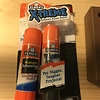
I agree with the other people’s comments – switch to glass. It’s the only way to print. I’d recommend 1/4" tempered glass (search on Amazon and/or eBay) and use the extra strength craft bond Elmer’s gluestick. I find it works a little better than the cheaper disappearing purple version that was mentioned. But either one works. And you will need a proper Z-axis shim and some clips to hold the glass in place.

What I wanted to add to conversion was on the discussion of leveling – particularly why there’s a difference in the center vs. the edges. It was suggested that the guide rods are bowed on MakerBot’s in general. I have three FFCP printers, all the newer 2016 model, and I too have experienced this. But I noticed something very interesting on mine – the plastic feed tubes for the filament push up against the top of the acrylic cover. Depending on where the carriage is positioned, it affects how much pressure is applied down through the top of the extruders and that causes the guide rods to bow slightly and at different amounts across the bed.

I first discovered this when I noticed that if I leveled the bed with the top off and then put the top on, it was suddenly out of level again. So for starters, level the bed plate with the top in place and make sure you don’t accidentally push down on the extruders while moving the carriage around for the leveling. Move it to position and release it before measuring. And I find a feeler gauge is more accurate than the paper sheet. I generally use the 0.127mm (0.005") gauge for leveling.

Also, I found that the filament guide tubes as supplied are a little too long. The first FFCP I got was used and was missing these plastic feed tubes entirely. I got some PTFE tubing and made my own and never had any problem with it. The second and third FFCP printers I got came with their tubes and I noticed they were longer than the PTFE tubing I had cut for the first printer. And it’s only those two that I have those leveling issues. The one with the home-made PTFE tubes doesn’t touch the top of the cover and I haven’t had leveling issues with it.

So, in addition to leveling with the top in place (if yours are touching), you may want to try to cut the filament feed tubes a bit so they aren’t as long and don’t touch. However, be sure to move the carriage around the entire area to measure things before you cut them, as they need more length in some directions than others. If you cut them too short, they’ll start popping out when printing, which will get annoying. And replacing them with PTFE tubing may help too, but doesn’t provide enough “extra” to justify switching if your original tubes are usable.

1 Like

Lots of useful information here. Someone below posted a kit that was available and I was going to probably get one of those. This is the 2016 model just for reference since I didn’t say that before.

I don’t have a feeler gauge and have been using the stock paper the printer comes with to measure. So this is something else I’ll have to get when I can.

I’m not sure if my tubes are too long or not. They brush against the top of the dome when the head moves past so maybe they are too big. How much did you trim on yours?

Also, do you apply the glue when it’s heated or heating up? Do you recommend it over sprays and should I even try these methods before I replace the plate with glass?

Thanks for the insight. I’m sure this whole topic will help others who are have similar issues to me.

Thanks!

I have the 2016 model.

Thanks for the instructions. I have a question. I heard that you need to be careful when leveling a build plate if it’s glass because you could crack the glass/damage the nozzle. Could you tell me about that if this is a thing I should be weary of? Thanks again.

I assume you have to out it into the freezer because the glass plate plus glue adheres much stronger than another plate would?

Once your machine gets about 1000 hours into it, The bed will settle into place and you wont have to adjust it every week.

Loose the blue pad.

Get some dollar store glass, (picture frames) and butterfly clips, 8x10 are easier to find and consider them disposable. Cheap glass will break on large abs parts as it cools. Throw them in the freezer when the part is done. While your part is cooling the freezer, you can throw on a new piece of glass and start right away. That the benefit of cheap glass. (reduced labor)

PLA… with purple Auqa net hair spray. bed 60, temp 230

ABS … Green PETG tape, sanded, drip acetone onto the tape and rub a piece of abs on it for the slurry. 110 bed , 230 temp

Your first layer should be “smashed” … The leveling card that comes with the machine is too thick.

Here are my perfected profiles for S3D and a Creator Pro… http://palmerize.com/3dprint/flash-forge-profiles.rar

If you have issues using the above profiles, then its either bed adjustment, mechanical issue, or surface prep to the glass. These profiles are not setup for small parts. If the parts are under 1" be sure to run at least 3 or 4 of them to keep it from melting. Multiple parts will reduce the amount of heat it absorbs.

Flash Forge should do themselves a favor and only send PLA with the machine. ABS is not a material to cut your teeth on.

We have around 20 ffcp printers at the moment and they are running constantly with barely any issues. We only ever received 1 with a slightly warped bed but the raft does help a lot with levelling so I’d try that first and with the correct settings and reduced gap between nozzle and bed.

Im trying to keep this simple to start with, I remember the early days of people making suggestions and everyone was different but just remember to only change one thing at a time.

on another note, we use a glass bed for abs with 3dlac spray occasionally and the glass just heavily cleaned with acetone for pla or use the blue bed either for either material.

If you suspect the blue blue bed may be contaminated you would be wise to swap it with one of the spares you get in the kit. The surface is very good and often too good as prints are often hard to remove which is why we use glass.

if you do decide to use glass, for your own safety you don’t want window glass or photo frame glass etc as it’s not resistant to temperatures you’ll be using. Borosilicate glass is perfect and there’s a shop that sells the kit with 3dlac spray. If it’s not sticking to the blue bed, it’s not going to stick to glass. The blue bed is definitely easier and you’ll need to print clips to hold the glass as bulldog clips get in the way of big builds.

lets just keep it simple and change 1 thing at a time.

to cut a long story short,pla on the blue bed is a good place to start and only move to abs after some practice as it can be a pain

hope that helps

I was going to get a Stargoods 3D printer Kit that someone here suggested. Do you think this is something that is incorrect? After listening to the suggestions and tinkering with the machine I’m pretty sure my core issue is adhesion to the bed. Almost every single print the initial trace layer peels right off the bed or gets pulled up slightly. This is probably over 80% of the time.

I don’t know that brand personally but as long as it comes with borosilicate glass

youll be ok. I’d recommend hair spray for abs or 3dlac spray which is very good and saves money on wasted prints.

First later bonding is rarely an issue on the FF blue beds, but contamination of the bed is very common and then people blame the bed itself but we do run the blue bed a lot and it’s never had an issue.

Id definitely go to glass at some point as it’s easier to keep the printer rolling and if you just put the glass in a cold work top, even abs comes free in minutes, you hear a little click and the print is then free, it’s very time saving as the blue beds can be a nightmare to get prints off.

if it were me, I’d start with printer settings and nozzle to bed gap, use some good quality filament as the cheap ones never work properly for long and then look at a glass bed. Always use a raft until you’ve had a bit of practice and also concentrate on pla to start with as it’s much easier and gives nice results even when you got a setting a bit off.

Everyone will have their own opinions but sadly some people base their own experiences as the rule and as facts but in reality every printer is a bit different even the same models have variations. As long as you keep away from window or photo frame glass you’ll be in the right track. There’s been some good advice given so far and some not so good advice, but if you stick at it and go with the majority I’ll bet you’ll be printing fine in a few days, then your questions will change to other things but we all know it’s a learning curve and in my experience everyone is happy to help. After all we are all in this together and just want to improve 3D printing for everyone.

Best of luck, I’ll keep an eye on the thread in case I can help with anything

just to add, when you decide you want to print ninjaflex and other flexible filaments you want to have a peak at flexion extruders, they improve even abs and pla prints as the mk10 we run standard isn’t great!

1 Like

It’s hard to guesstimate how much I trimmed the tubes on mine as I did it by sight without actually measuring. At the time, I was in a hurry and needed to get a print going, so I just guessed at it and figured that if I got it too short, I’d swap them for some PTFE tubing.

For the feeler gauge, you can grab one of those at your local car parts place. They come in several different ranges of thickness. Be sure to get one that goes down to the smaller 0.002" - 0.010" range, as you’ll want something around 0.005" (0.127mm) or so. Some don’t start until 0.008" or 0.010" or so, such as the valve and tappet gauges, so just be careful to check that and don’t assume it has all of the smaller sizes.

On the gluestick, you’ll want to put it on when the glass is still cold – or at least something below 40C. I’ve found that if you put it on with it hot or even still warm, the glue globs up and doesn’t do right. I found that out when doing back-to-back prints and trying to turn it around before it had cooled enough. It just doesn’t work.

I usually put a thin layer horizontal and a thin layer vertical. I also have got into the habit of always coating the entire glass – too many times I’ve tried to guesstimate where it will be printing only to miss a vital corner or edge of the print.

You can actually use the glue now on the “blue sticker”. It will really help adhesion for ABS, or so I found while experimenting with that while waiting for my glass to arrive. It won’t work as good as glass, but is better than trying to print without glue. As for sprays, like hairspray, to me that’s way too messy. Hairspray leaves a nasty residue all over everything. And that means you really need to take it out (outside even) each time to spray it, and that means releveling the bed every time. With the gluestick, you can clean it down (I use 70% isopropanol and thoroughly clean it between each print) and reapply glue and print without leveling the bed again. Unless you have to do a lot of prying on the print, it will stay level for dozens of prints.

Speaking of prying them loose, with ABS, the natural warping effect really helps that. When the bed cools below 50C or so, prints with a lot of contact surface will almost always just pop free on their own. What is a little counter intuitive is that the larger the contact area, the more glue you need (thicker glue layers). You would think that the large contact area would naturally have more bonding surface, but the warping tension of ABS counteracts that. Where you have to be careful is on prints with lots of small contact surfaces. For example, if you have a print where the majority of the contact area is supports. The typical grid support structure works really well to hold firmly to the glue as it has minimal warpage due to the smaller contact patches (i.e. the temperature differential is less). Yet, the supports can be printed with a moderate gap to the part to make them easy to break free and remove.

As you print more and more things, you’ll start to see what I mean by counter-intuitive with glue and ABS. The most extreme example was when I was printing a piece very similar to the right-end carriage piece of the FFCP that I was designing for another (non-FFCP) printer I am rebuilding. It has a very intricate shape and needed extreme supports no matter how you positioned it. But, I wasn’t thinking about the fact that the contact area was mostly support grids and applied a larger amount of glue like would be needed for a part of similar large size with that large of a contact area. The result was that I had to pull the glass bed off the printer, take it to my workbench, and whack the part with a rubber mallet to get it loose.

When you install the glass bed, you’ll still want to keep the aluminum plate. It will help transfer the heat from the heater PCB and help it to more evenly distribute. As for the “blue sticker”, you have a couple of options. You can rip it off completely or you can just put the glass on top of the sticker. If you remove the sticker, you should put a layer of kapton tape between the aluminum and the glass. That will also help with that temperature junction. If you leave the blue sticker, it will serve the same purpose.

On one of my printers (the one I got used), I completely removed the blue sticker because the previous owner had tried to replace it with a new sticker and did a horrible job with the new one. It wasn’t even and had giant air pockets in it – making it impossible to level and print on. So it had to come off. The other two printers, I just left the blue sticker on and attached the glass with custom printed clips to the top. Though if you leave the sticker on, you will need to account for it in the thickness of the Z-axis shim.

For the majority of print materials, the glass is the best print surface. But there are a few exotic filaments out there that actually works better with the blue sticker – like some of the clay sculpting filaments and some of the investment casting mold filaments. And maybe even NinjaFlex. So, leaving the blue sticker on gives you the option of easily switching to it in the future. I can’t tell any performance difference between the printer without the blue sticker and the ones with the sticker. The glass seems to heat about the same on both configurations.

Another adhesive you may want to try for ABS is “ABS juice”, made by dissolving some filament in acetone. It’s probably no messier than the gluestick. However, it will most likely leave a bit of residue on that side of the print as the acetone reacts with the plastic being printed and with the plastic that was dissolved to make the juice itself, where the gluestick, on the other hand, is completely water soluble and just washes right off.

And gluesticks are actually PVA based and is a lot like printing with PVA support material.

Happy printing!

1 Like