What sort of accuracy (precision) should I expect with a 3-D Printer?
I recently purchased a (slightly used) Makerbot replicator Z18. Generally I am pretty pleased with it but the accuracy seems questionable.
I have a part designed in Solidworks and opened with Rhino. The thickness, measured in Rhino is 0.090" The thickness of the resulting print is 0.097". As a result two pieces don’t fit together.
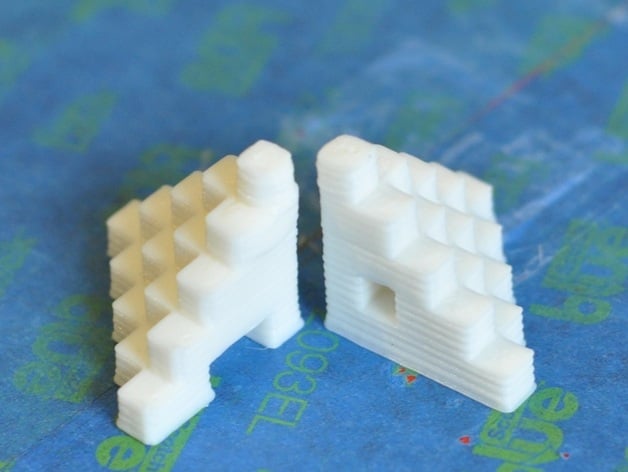
So, I downloaded a “calibration model” from thingiverse and printed it:
The part is a pyramid built of stepped 5 mm cubes. After printing it I measured two rows of steps in each of the X, Y, and Z dimensions (9 measurements in each direction). What I found was:
Z dimension (up and down)
Max error: 1.60%
Min Error: 0.42%
Error Range: 1.19%
Average Error: 0.78%
X dimension (left / right)
Max error: 4.14%
Min Error: -0.69%
Error Range: 4.83%
Average Error: 0.85%
Y dimension (back to front)
Max error: 5.16%
Min Error: 0.59%
Error Range: 4.57%
Average Error: 2.24%
These numbers seem pretty high… What’s more alarming is the range in measurements which would indicate lack of predictability.
Is there any way to tighten up the accuracy, or precision of the Makerbot Z18?
SOC3D
2
What type of material are you printing?
SOC3D
3
Also have you tried scaling that pyramid by a factor of 2 and checking the accuracy? Makerbot lists the resolution as: XY POSITIONING PRECISION 11 MICRONS [0.0004 IN] Z POSITIONING PRECISION 2.5 MICRONS [0.0001 IN] It also comes with a .4mm nozzle - a .25 nozzle will increase your accuracy slightly at the cost of build speed.
We are printing PLA for now.
Where can I get a .25mm nozzle? I don’t see one on the makerbot web site. Also, if I load a .25 mm nozzle, will the Machine recognize that or do I need to make a configuration change.
Thanks
Yes, you would need to make a configuration change and probably switch to a slicer like Simplify3D, I don’t know if Makerware lets you set extruder diameter.
That cube is 25mm in xyz. The accuracy of the makerbot is independent of the size of the object for the most part. So for an object double the size, your % deviation will probably be half, and so on, but your actual error in MM will be about the same. So with very small items, your % error will be large compared to big objects you can print on the z18 but you will still see the same variation.
That cube is 25mm in xyz. The accuracy of the makerbot is independent of the size of the object for the most part. So for an object double the size, your % deviation will probably be half, and so on, but your actual error in MM will be about the same. So with very small items, your % error will be large compared to big objects you can print on the z18 but you will still see the same variation.
SOC3D
10
This is true for macro scales above a few mm. The line width and positioning and slicer settings as well as the expansion and contraction of the material will show a higher percentage and length width of error.
Sean,
There are several things that can go wrong with the Z-18 as the gantry ages, especially if it’s been indifferently cared for. The two things to check right away are the two idler pulleys at the front of the machine’s H-Belt, and the bolt that attach the two linear bearings to the moving part of the gantry. Based on the unpredictable nature of your errors, my bet is that both of these parts need urgent attention.
Early z-18’s (the first year to 18 months of production) used undersized bearings on the two idler pulleys. They tended to fail after a few hundred hours of use. Once the bearings fail they turn into powder and the idler starts flopping around unevenly on its shaft. This destroys the machines accuracy and adds a lot of ‘z wobble’ to the prints. MakerBot dosn’t sell these parts, so you have two options for repair. 1) Buy another used Makerbot 5 gen machine and scrap the idler bearings out of it. You can usually get the baby 5th gen on craigslist for a few hundred bucks. 2) Take the failed idlers and their shafts to a machinist and have them fabricate new idlers with larger diameter bearing that ride on the original shafts. This is what I did. My new idlers cost $10 apiece from a buddy with a lathe, and have been running for a few thousand hours now.
On some Z-18’s the screws that hold the moving section of the gantry to its two linear bearings can come lose, or even fall out. Once this happens, the angle between the moving gantry and the frame is no longer rigid, and all of the angles and dimensions in everything you print will be off by some random factor. You can check for this by opening the top of the machine, and trying to torque the gantry out of alignment with your hands. If it moves out of perpendicular at all, you’ve got a problem. To fix this, you’ll need to replace any missing screws and torque down all of the gantry screws. Loctite is great for keeping everything in place, but be very careful it doesn’t drip down and destroy the linear bearing.
Lastly, If your machine didn’t come with a new Smart Extruder+… Go buy one from MB now. They are worth every penny.
-Michael Curry
mik111
12
This is not the kind of quality I would expect from a machine that costs $6000 new.
SOC3D
13
Cost does not equal quality.
Michael:
Thank you for your thorough reply.
I will check the various issues that you raised when I return to the office on Monday and will let you know what I find. Is there a diagram somewhere which shows the locations of the various parts, screws etc that you mention?
Thanks again