3Dmigos
1
Hi,
My bed has stopped heating up… Can anyone post images of what I need to check for loose connections to get it working agian.
Thanks.
Cris.
Check the electrical connection at the bed. Mine melted alwhile ago . I ended up replacing the stock wire and connector with some hightemp silicon covered wire soldered directly to the bed.
3Dmigos
3
Thanks - can anyone post or point me to an annotated image so I know what I’m looking for?
Dhin
4
I would check the main board and make sure everything is connected, you can access it by removing some screws on the bottom of you FF. The connectors are usually secured with a bit of glue, but they can still come loose because of vibrations and may need to be reseated. (The heated bed is labeled “HBP” it should be the third green connector on the to left side of the board.)
Before you start digging into the wiring and everything, it is worth checking that all the connectors are seated correctly.
Well it just so happens my FFCP is up on the bench getting some upgrades so photos are convenient.
OldEtectricalConnector.jpg < my original burn electrical connector.
ModdedConnection1.jpg < modded connection to HBP
moddedConnection2.jpg < another view
moddedConnection3.jpg < overview of HBP connections
bottomofFFCP.jpg < bottom view of FFCP with shield in place, remove six philips screws to remove
FFCPMainBoard.jpg < Mainboard closeup of HBP connection. Green connector to the right of “HBP” letters printed on Mainboard.
If your machine is new (under warranty) might want to talk to the FlashForge support guys first if you’re interested in getting OEM parts.
Dhin
6
It isn’t annotated but here is an image of the board.
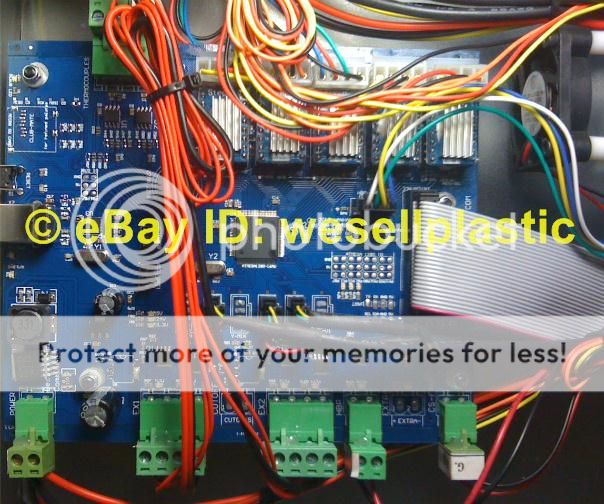
The green connectors at the bottom are all labeled pretty well. Left to Right the green connectors are: Power, Extruder Head 1 (Heater and Fan), Extruder Head 2, Heated Bed (this is the one you want to check, it is half the side as the extruders) and the last one is the board fan to the far right top in the image.


