Firstly regarding the bed, be aware that the print life of the blue build sheets are around 100-150 hours (more if you can print all over it and spread the wear).

However, if you’re wanting to improve quality and take your FFCP to the next level I’d recommend the following upgrades:
1. Glass bed upgrade kit (this improves the flatness of the surface you’re printing on and makes levelling easier) - many places you can get this but I prefer to order from Makersome in the USA
2. PEI sheet (long lasting print surface, works with ABS and PLA and makes it easy to remove things when they cool down) -get from Amazon
3. Hardened Nozzle Replacements (higher lubricity, don’t wear as quickly/easily when printing with mixed materials like carbon fibre and in general last muuuch longer) - Performance 3D, Protopasta and a few others sell these.

Top-end upgrades: (read $$$)
4. Aluminium extruder assembly upgrade (increased cooling and easier levelling of extruders) - wmd products is the best one I know of.
5. All metal hot-end (increased maximum temperature, removes the need for PFTE lining tube) - AVN swiss makes these

Next up, the other issues:

The rounded bottom issue you’re seeing is a result of an overhang without adequate support. If you’re using something like simplify3D then use the “Dense layers” setting in the support tab to increase the infill percentage for the support just before you reach the actual piece you’re printing. Alternatively if you’re printing in ABS, decrease the temperature a little and increase the cooling fan speed; it can also help to drop back to a smaller layer height (say 0.1mm) just until you’re past this overhang.

Hope this helps; feel free to message back with any questions!

- Andrew

At minimum I’d recommend checking out the glass bed upgrade (find someone in your local area who can machine borosilicate glass to the right size) and order the PEI sheet off amazon. You’ll find your prints adhere well, bed is easier to level and you don’t have to replace the PEI for months.

I’ve been printing with one printer for nearly 2,300 hours now and I’ve had a single PEI sheet on for around 4 months of solid printing; I just take the glass bed + PEI sheet out every now and again to wipe/wash it off as I also print nylon on it using a water soluble glue stick.

Sometimes, bot heads are not leveled simply because one head really is too high (or the opposite). There is a screw on the back of the metal bar that both heads are crossing that will let you adjust vertically. not super easy to access, though, you probably will need to remove both extruders. I did that one day: removed both extruders, started qualibration, adjusted the head that was too high, fixed the problem!

Another great think to do is,if you like quality, pulling up the unused head, or even, if you like extreme but powerfull measures, remove it like I did. that will lighten the heads block thus attenuate the rippling that you are complaining about.

Btw that rippling is unfortunatly typical for XY printers with heavy heads blocks and high speeds. To fight it, you need to work on these:

- lightest heads block

- tighten regularly all the bolts of the FF, add washers where you see fit (to avoid that every time that you tighten them the wood would let the head penetrate)

- moderate the speed (obviously, when one Axis is stopped at once (on a 90° corner), slower speed is less abrupt and then creates less rippling

- Try turning the part 45°, thus distributing the inertia to both axis; (One think that is quite magic with the prusa is the X and Y axis are not affecting each other, thus less ripples on these)

- check accel/deceleration settings?

Unfortunatly, the highest resolution comes with the worse overhangs. On little trick can fight it a bit: thicker walls. Aboce 50°, having multiple coutour lines gives a much better base for the next layer.

Print with your lowest nozzle. Worry about leveling both nozzles later.

Measure your filament several times

Kapton or PET tape

Apply abs slurry to a paper towel and let it dry.

Then, wet the paper towel with clean acetone and wipe the bed when cold.

This will apply a super thin abs film to the print surface.

S3D

Turn skirts on and double them.

Adjust the bed while its printing the skirt.

Then try to peel the skirt with your fingers, If the skirt sticks well, then you know your bed is level.

With ABS slurry you can lower your bed temp to 80 degrees.

Lower your first layer height to compensate for the first smashed layer. That should reduce the bubbles on the first few layers.

Increase first layer extrusion width to increase adhesion

Trim off the bottom of the bottle or replace the fillets with chamfers to reduce the overhangs.

To combat shrinkage, print ABS at the lowest temp possible… This can be found by heating up the machine and manually feeding the filament while its heating up. Once the filament is easy to feed manually, note the temp an print with that. ABS on my machine is around 225-235.

Consider using PETG filament. Prints like PLA but is stronger than ABS

To combat ghosting.

Lower your print speed to around 40 or less.

Print a Nema 17 motor found of Thingaverse, run the fake stepper motor to reduce weight.

Turn acceleration on via the LCD on the machine

Meshmixer, a free program, may have better supports for this application. At times they can be difficult to remove.

Good luck, I hope this summery helps.

Hello J, to start I have almost the same machine and is the best ever! All my prints are successful, like an Uprint,…I can let my machine running even when it doesn’t start the job, and when I came back the print is with very good results. So which are my secrets! First of all you need a glass plate, buy it from a dolar store a frame that fit in your platform,…cut it with the right dimensions,…the too is very cheap in harborfreight. Then when it was cutted you need to make it roofed as you can, so take another piece of glass and regular sand from the beach or what ever,…and put it in the surface with water, then sand the glasses with this technic one against the other and you will see the good results that you will get. Then you need to fit into the platform, my method is using kapton tape to fix it permanently and avoiding the nozzles hitting the paper clips. Forget about the ABS slurry, spread some aceton on the plate and use a missed print with the same color and swipe with the aceton over the build plate, you can repeat if you will need more, is the best for sure, very good stick and you can remove the part as easy as using just a finger. Then the slicer, Im using S3D, is the best one. You can download the profiles file from the flashforge webpage, or from klick-n-print webpage, I really don’t remember where I got it. You can control everything in your part, the layer height, but the most important part is the support,…to get the best results you need to make some print tests, the % of support doesn’t matter, whats really matter is the bed that you build betwen the part and the support, is like a raft but in the upper part, in every part that touch your model. You need to test, the separation and how many layers do you really need. But the separarion, I can remember the real name of that,…but is the setting that matter in the lower part of your model quality,…the separation, makes your model smoothly and with a really good look as your upper part of your model,…but if you decrease that much the distance it was really hard to peel out the support,…so test it print in the same build the same model modifiying this parameter in five profiles and take notes of the. I hope that it would be helpful Happy print and test

1 Like

Ok. Not sure i understood it all but i will definitely give a look at how to get better process for S3D

I will keep that in mind. Everyone is giving me so many solutions. Not sure what to start with

Hello Sir,

This is Mavis from Flashforge. I consulted our engineer. Please check suggestions below:

1. Did you use any other glue when printing? FF already stick a blue sheet on the build plate, and this will help filament to stick on build plate. Or you can use a blue tape instead.

2. For the round bottom, we suggest you to choose support. If you print with ABS, you can choose liner support; if you print with PLA, tree-like support is better. From your pictures, the one made with Makerbot slicer looks better. You can rub the surface after the printing or choose HIPS filament as support.

3. The cause of the bottle you print is the speed of ABS printing. You can slow down the ABS print speed, and it will be better.

Please contact us if I made something wrong. Welcome your suggestions.

Thank you.

4 Likes

Thanks for jumping in, guys! @JuliusWS, hope this helps :wink:

1. I kind of used a glue despite of me. I cleaned the slate with alcohol to make sure i had a clean clean bed but there are still some area hard to remove.

2. The makerbot looks better but inside i have no control over support so it’s no point really and the support was a MESS to remove from the part. I’m using support from the begining

3. I made another try over the week end. Possibly i will run another one this week and post the results.

Mavis = Most helpful and responsive FF employee ever! :slight_smile:

“Print a Nema 17 motor found of Thingaverse, run the fake stepper motor to reduce weight.”

Sorry, I didn’t get that…

Where do I use this fake stepper motor? Reduce the weight of what?

Ok, duel extruder printers have two stepper motors, the style is " nema 17" one for each extruder. If you only print with one head, remove the motor from the Un used side. Go to thingaverse and search for nema 17. Print up a nema 17 motor and place it where the old one came out. This can reduce the weight up to 40% and will reduce ghosting.

Start with as many as you can. Save the suggestions to notepad or word. Then. Check them off as you go down the list. Once you get your profile and machine tuned, changes become less frequent.

By the way, at some point FlashForge started shipping a polycarbonate bed with their printers (I think it is blue, I don’t have one). If you’re using one of those, you really don’t want to use acetone on it. Acetone won’t dissolve polycarbonate, but it does attack it and weaken it. It also is able to etch polycarbonate which will change the surface texture perhaps to be more sticky.

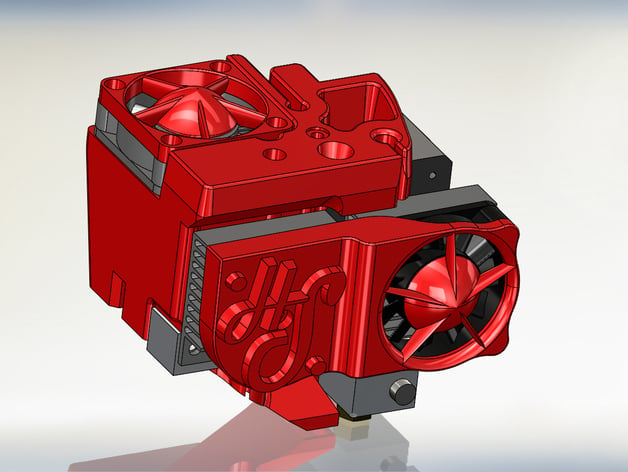
If you’re going to switch it to 1 extruder my recommendation would be to print up this instead.

Indeed S3D have this setting for “dense layer(s)” on to of the supports, defaults to 0, but can be changed to f.e. 3 (if 1, then bridging between the non-dense and the only one dense layer may make it very uneven). Then another setting let you decide of the distance (in layers) between that dense layer and the part itself. I think I use 1 most of the time.

What I wanted to add to the dense top support setting advice is that you could get better results if you would raise the part see for like 3mm so the whole ‘bottom’ would be printed on the dense layer and then get more uniform results (but of course loose the shiny mirror like flat bottom you would have got from slury/spray on glass :-))

Tested that, and still have it on without the upper fan and without the lower fan duct (that duct is not very optimal compared to some circular ducts you can find on thingiverse). My point here is as much as I value that thing, it aint perfect yet.

If I was to do it again, I would go for the printed hollow nema.

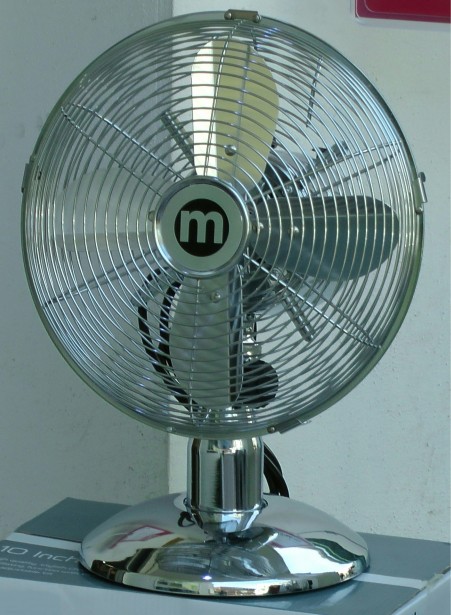
And for the fan, well, I suspended 45° over my FF a fan like this and it does an amazing job (at the lowest speed of course)

Yes, I know, that’s unusual :slight_smile:

I had the same problem using the stock blue build-tak that it comes with, it sticks worse with time. I removed the tape and started using a glass plate with ABS juice. It still sticks like the devil sometimes when I put too much juice on the plate, BUT I can easily remove the plate and put the whole thing in the freezer for a few minutes, afterwhich it pops right off. A side benefit of the glass plate is that you can look at the bottom of the print and see where it’s already coming off the bed, which give you a clue as to where to start prying.