The winter holidays are almost here, and for some of us that means entering in full Do Not Disturb mode. Yeah! If you plan to take some well earned time off, then we strongly recommend taking your printers offline.
Here’s why
One situation that we regularly see on the platform is that a customer sends in an order only to get no reply from the Hub. When this occurs we’ll put your Hub automatically offline to prevent them from wasting valuable time in getting his/her model printed. After that, we’ll notify you about this via email, so that you can put your printers back online whenever you’re ready to get back to printing.
Of course, there are many other situations when you as a Hub are not available for printing, like for example you want to spend the weekend binge-watching your favorite TV show, or you’re busy with your current ongoing orders, or maybe your printer broke down. Which we certainly hope NEVER happens! In those cases however you can easily take your printer(s) offline so you won’t be visible to customers.
How does that affect me as a Hub?
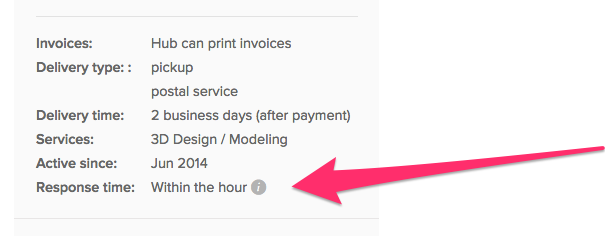
As we mentioned in one of our previous posts, response time matters as it is directly reflected on your Hub page. So taking your printer(s) offline will be in both you and the customers’ best interest.
Ok, got it! Now what?
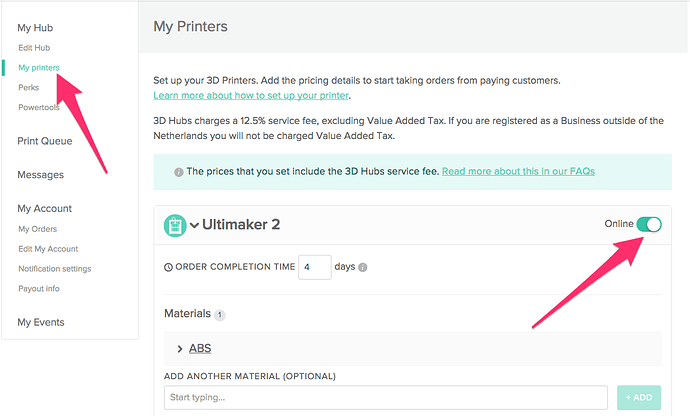
Taking your printers offline is very simple. All you have to do is:
- Go to your Hub dashboard
- In My Printers section set your printer(s) Offline (or Online, depending on the case)
That’s all!
If you have any feedback, comments or questions, be sure to leave them in the comments section below.
Best,
Gabriela

9 Likes
JATMN
2
I would also recommend switching to “offline” a day or so before your planned offline depending what your guaranteed completion time is for your hub. While it might not be a big deal if you only plan to have 1 offline day… but it might upset random customers…
Example… if you plan to be offline from Thursday until Monday. But you offer 2-3day processing… you should probably go offline 2-3days before your “planned offline” because the customer will be upset if they place a order on monday or tuesday expecting to see the order by the end of the week or even monday or tuesday when you wont be “online” again until monday. Your 2-3day order just turned into a 3-6day turn around.
2 Likes
Hey @gabriela3d,
maybe it would be a cool idea to have these snippets of 3DHubs-knowledge compiled and accessible in a separate tab from the “Learn” drop-down up top. Otherwise older posts like the pricing system explanation might get lost in the vastness of time and space.
Sincerely,
Jonas
4 Likes
Happy to see we’re on the same wave length, Jonas  Soon, all the How to Hub learnings (related to Hub administration and taxes, customer support, pricing system, etc), will be soon collated on the current How to Hub page - we’ll let you know once ready. Thanks!
This is solid practical advice - thanks for the input @JATMN! Cheers
1 Like
ferkan
6
Yes, this is great!
Well explained.
1 Like
Useful, will definitely do!
2 Likes
Hey @gabriela3d,
Does taking my printer offline affect active orders? I’m going to finish them, but i don’t want any additional requests in the mean time.
Thanks in advance!
J
JATMN
11
No… active orders are not affected. You can process them as normal